

Forms are the lifeblood of your website they capture interest, ideas and opportunities every single day. But collecting data is only half the story. The real magic happens when you put that data to work. With the Gravity Forms Trello Addon by 8Muses, every submission turns instantly into an actionable Trello card. No more tedious copy paste routines or messy spreadsheets. Instead, your workflow runs on autopilot keeping your projects organized, your team aligned and your progress crystal clear.
Each new form entry drops right into your Trello board, perfectly placed and ready to be assigned, tracked, and completed. It is simple, smart and saves you hours so you can focus on getting things done, not managing data.

What Is Trello?
Trello is a beautifully simple, visual project management tool built to keep you and your team on track. Using its intuitive “board and card” system, you can easily manage tasks from start to finish tracking progress, assigning responsibilities, and collaborating in real time.
At a single glance, you will know who’s working on what, what is pending, and what is done. If you are running a blog, managing clients, or overseeing an entire business workflow, Trello helps you stay organized without the overwhelm.
Why Teams Love Trello
-
Effortless Setup – Create boards, add lists, and drop in cards you will be organized in minutes.
-
Built for Collaboration – Assign team members, comment, and share updates instantly.
-
File-Friendly – Attach PDFs, images, Google Docs, and more directly to cards.
-
Crystal Clear Progress – Visualize your project flow at every stage.
-
Templates for Every Workflow – Jumpstart your setup with customizable board templates.
Who Is Trello For?
Trello is designed for anyone who wants clarity and control over their projects from solo entrepreneurs and freelancers to large organizations.
-
Break down complex projects into easy, trackable steps
-
Plan your editorial or content calendar
-
Manage sales pipelines and client relationships
-
Organize social media campaigns
-
Document internal processes or company SOPs
-
Track goals, milestones, and OKRs
Why You will Love the Gravity Forms Trello Addon
The Gravity Forms Trello Addon connects your website forms directly to your Trello boards no coding required.
Whenever a user submits a form, the addon automatically creates a new Trello card containing all the information you have chosen to sync. Customize everything from card title and description to list placement, labels, and assigned members.
Key Features That Power Your Workflow
Automatic Card Creation – Every form submission instantly becomes a Trello card.
Custom Data Sync – Decide what information appears on each card using merge tags.
Automatic Assignment – Assign tasks to team members right as they are created.
File Attachments – Attach uploaded files to Trello cards automatically.
Conditional Logic – Control when cards are created based on custom form rules.
How To Set It Up
Setting up the addon is quick and effortless
-
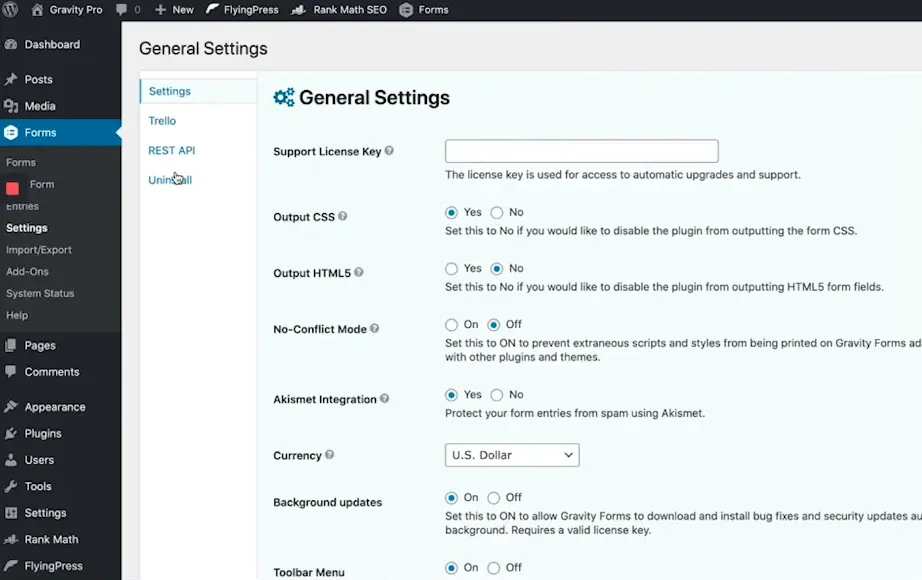
In your WordPress dashboard, go to Forms → Add-Ons → Trello → Install & Activate.
-
Navigate to Forms → Settings → Trello and connect your Trello account.
-
Authorize access — it only takes a few seconds.
-
Create a new Trello Feed
-
Select your preferred Trello board and list.
-
Choose what data should appear on each card (title, description, labels, assignees).
-
Use merge tags to automatically pull form data.
-
Enable conditional logic if needed.
-
-
Click Save Settings and you are done!
Simplify, Automate, and Stay Organized
The Gravity Forms Trello Addon by 8Muses is your bridge between form data and real world action. It turns every submission into an organized Trello card complete with all your key information, files, and assignments.
Empower your team. Eliminate busywork. Automate your workflow.
Start managing your form submissions smarter with the Gravity Forms Trello Addon today.
Related products



 Gravity Forms Trello Addon
8,00 $
You may add any content here from XStore Control Panel->Sales booster->Request a quote->Ask a question notification
At sem a enim eu vulputate nullam convallis Iaculis vitae odio faucibus adipiscing urna.
Reviews
There are no reviews yet.