
Listening to your audience is one of the most powerful things you can do and the Gravity Forms Survey Addon makes it easy to truly hear what people have to say. Designed for real connection, this addon transforms your regular Gravity Forms plugin into a complete, intelligent survey system that lives right inside your WordPress site. It helps you ask meaningful questions, collect honest answers, and understand the people who matter most to your business or project.
With just a few clicks, you can create professional surveys that look and feel natural. Add rating scales, multiple choice questions, rankings, or open ended text fields each crafted to encourage authentic responses. Every part of your survey can be customized to fit your tone, style, and purpose.
What Is the Gravity Forms Survey Addon?
The Gravity Forms Survey Addon is an official extension designed to help you build engaging, flexible, and professional surveys directly inside WordPress. It integrates seamlessly with Gravity Forms, allowing you to create surveys that look and feel natural on your website all while giving you complete control over design, functionality, and data.
Why This Addon Stands Out
Every interaction with your audience is an opportunity to understand them better. The Gravity Forms Survey Addon does not just collect answers it helps you uncover patterns, motivations, and real human perspectives. It is designed to make feedback collection effortless, but its real magic lies in how it turns data into meaningful stories about your users, customers, or employees.
-
Visually seamless – fully integrated into your WordPress theme.
-
Intelligently dynamic – with conditional logic for personalized experiences.
-
Data rich and insightful – built in analysis tools show trends instantly.
-
Privacy respecting – you own 100% of your data.
How to Create a Gravity Forms Survey
Creating a professional survey is fast, intuitive and completely within your control. Let is break down the process.
1. Create a New Form
Start by navigating to Forms → New Form in your WordPress dashboard.
Give your survey a descriptive name, like “Customer Experience Survey” or “Team Feedback Form.” You can even add a brief introduction message to set expectations for participants.
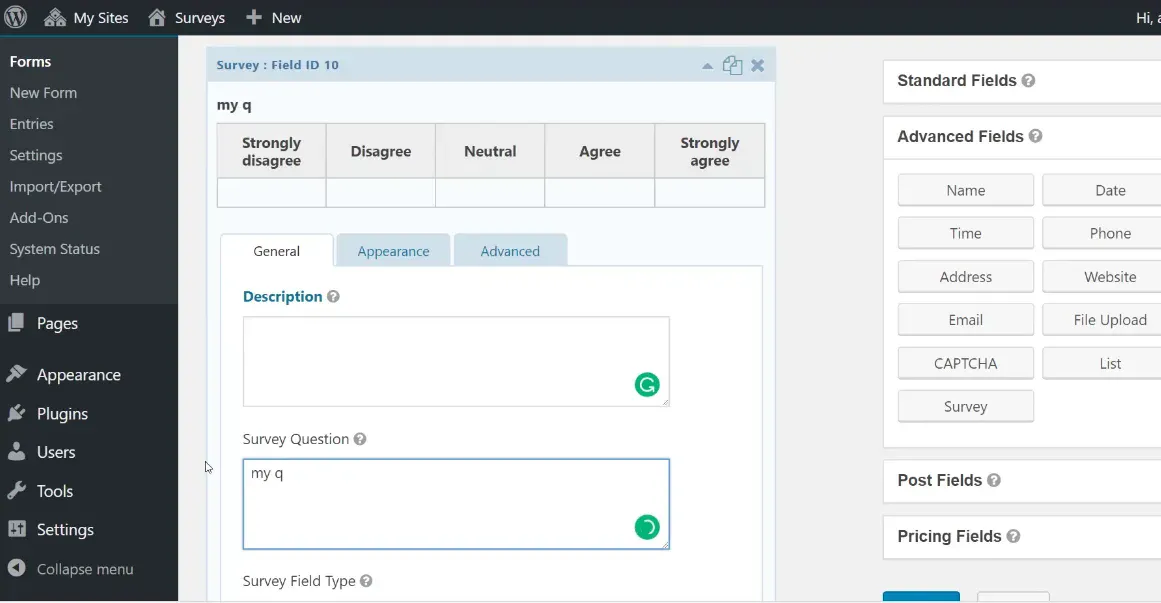
2. Add and Configure Survey Fields
-
Likert Scales: Ideal for agreement or satisfaction ratings (“Strongly Agree” to “Strongly Disagree”).
-
Ranking Fields: Perfect for prioritizing preferences or product features.
-
Rating Stars: Make evaluations visual and engaging.
-
Multiple Choice & Checkbox Fields: Great for structured questions with clear options.
-
Paragraph Fields: Capture deeper, open ended insights in your respondents’ own words.
3. Configure Basic Settings and Display Your Form
-
Customize button labels and thank you messages.
-
Set up notifications so you get alerts when responses come in.
-
Limit submissions or require logins for internal surveys.
-
Style the form to match your brand perfectly.
4. Analyze and Understand the Results
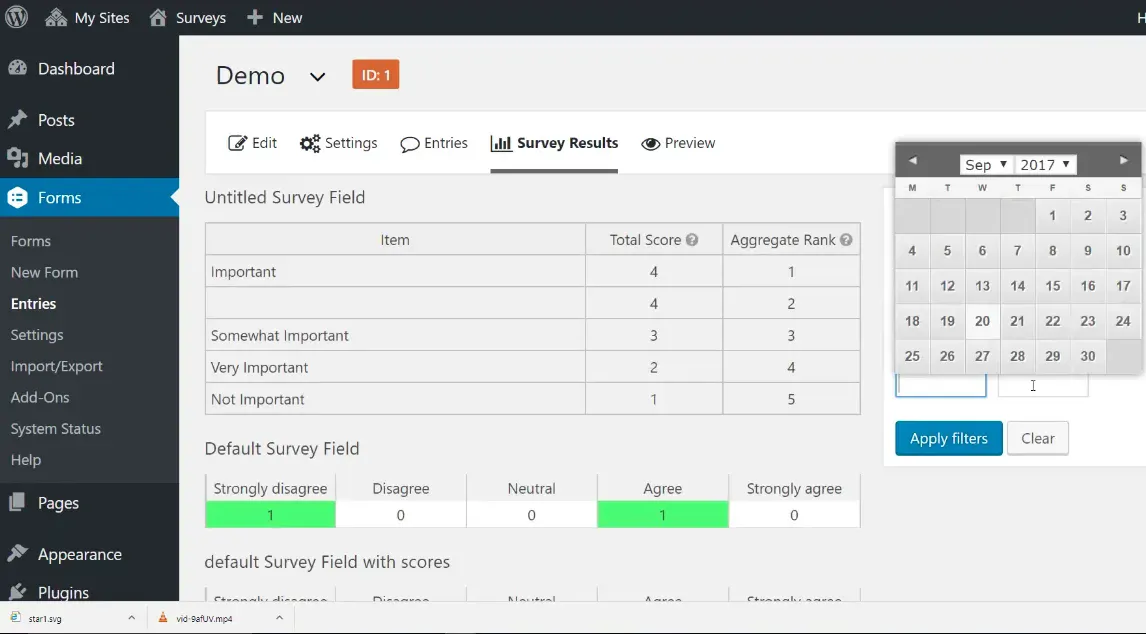
Here is where Gravity Forms shines. You don’t just get raw numbers you get clear visualizations.
Under Forms → Entries, you will find built in reporting tools that transform your data into graphs, charts, and summaries. You can easily filter responses, compare trends, or export results to CSV for advanced analysis.
Enhancing Your Survey with Gravity Perks
-
Preview Before Submitting: Let users review their answers before they submit to ensure accuracy and completeness.
-
Limit Survey Entries: Control how many times someone can submit to prevent duplicates and keep results clean.
-
Share Data Between Forms: Seamlessly pass information, like names or emails, from one form to another using Easy Passthrough.
-
Restrict Checkbox Choices: Set limits on how many options respondents can select to keep data balanced and focused.
-
Email Survey Respondents: Automatically send thank you messages, updates, or follow ups after submission.
-
Add Smooth Page Navigation: Improve longer surveys with progress bars and multi page layouts that make navigation easy.
-
Set Word or Character Limits: Keep open ended answers concise and easy to analyze with custom limits.
-
Connect With Google Sheets: Automatically sync survey results with Google Sheets for real time collaboration and tracking.
-
Auto Save Progress: Allow users to save their answers and return later perfect for detailed or multi step surveys.
Who Can Benefit from the Gravity Forms Survey Addon?
-
Businesses collecting customer satisfaction data.
-
HR teams running employee engagement surveys.
-
Marketers conducting market or brand perception research.
-
Event planners gathering post event reviews.
-
Educators collecting student or course feedback.
Performance, Privacy & Compatibility
Built for speed and reliability, the Gravity Forms Survey Addon works seamlessly with modern WordPress themes and plugins.
It’s fully responsive, translation ready, and GDPR compliant, ensuring user data stays safe and accessible only to you.
Plus, because it is part of the Gravity Forms ecosystem, it’s backed by regular updates, strong documentation, and a massive user community.
Why Get It From 8Muses
At 8Muses, we believe great websites are built with great tools tools that simplify your workflow and amplify your results. We carefully curate premium WordPress plugins that are tested, secure, and optimized for performance.
-
Authentic and verified software
-
Smooth installation and compatibility support
-
Expert advice to help you get the most out of your tools
-
Ongoing reliability and updates you can trust
Create Your First Gravity Forms Survey Today
Stop guessing what people think ask them directly, beautifully, and confidently.
The Gravity Forms Survey Addon helps you capture real opinions, understand your audience, and make smarter, data backed decisions all within WordPress.
With a drag and drop builder, smart analytics, and endless customization, you can create surveys that are not only effective but enjoyable to complete.
Related products



Sale!


 Gravity Forms Survey Addon
8,00 $
You may add any content here from XStore Control Panel->Sales booster->Request a quote->Ask a question notification
At sem a enim eu vulputate nullam convallis Iaculis vitae odio faucibus adipiscing urna.
Reviews
There are no reviews yet.